Pango Playground for kids
Studio Pango - Kids Fun preschool learning gamesEducational
4.025.00 Reviews
- Version
- 26013034
- Installs
- 10.00K
- Age Rating
- Everyone
Screenshots
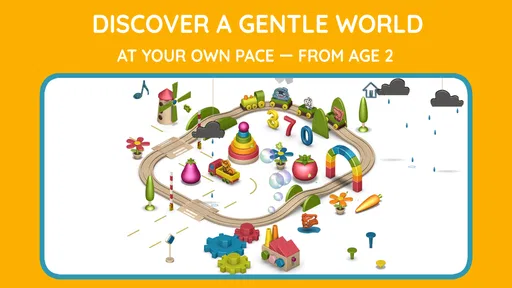
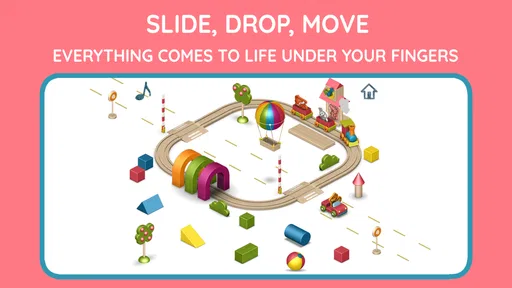
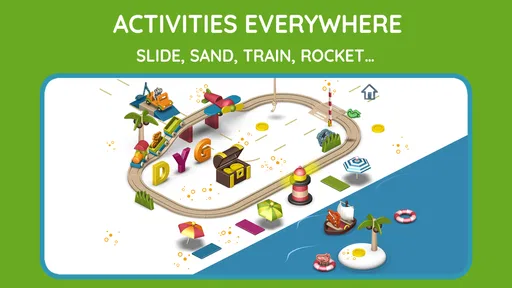
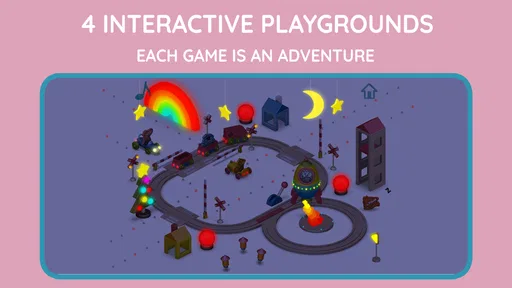
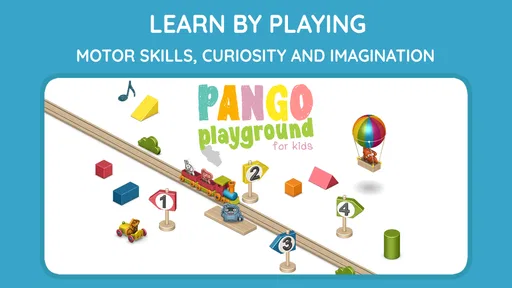
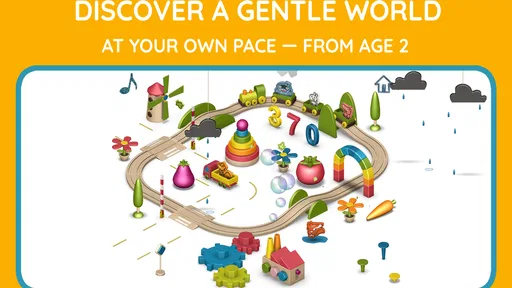
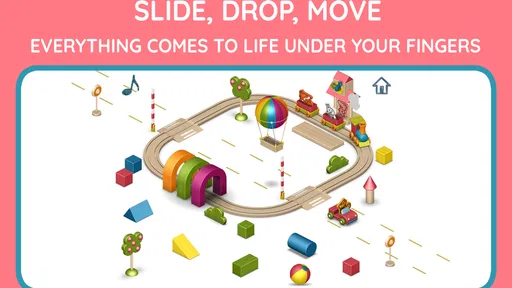
Our Review of Pango Playground for kids
 Analysis by Appyee
Some children’s games are built around bright rewards and constant noise, while Pango Playground takes a quieter route. I found it more like a small digital playroom than a lesson with right and wrong answers. The child explores, moves objects, and creates little scenes at their own pace. That makes the first sessions easy to enjoy, especially for preschoolers who are still learning how to use a touchscreen without needing a complicated goal.
This is an educational game from Studio Pango - Kids Fun preschool learning games, aimed at Everyone and available for $5.99. It has an average rating of 4.0 from around 300 ratings, with over 10K installs. Those figures suggest a modest but established audience rather than a huge mainstream hit. After spending time with it, my overall impression is that its value depends less on how exciting the first day feels and more on whether your child enjoys open-ended pretend play.
What the first week feels like
The immediate appeal is the freedom to investigate without pressure. Instead of asking a young player to memorize letters, complete a timed puzzle, or follow a long chain of instructions, the game presents an interactive miniature world. A child can touch, drag, and experiment, then watch the scene respond. That simple loop is accessible to children who may not yet read confidently.
I especially liked the gentle pace. Preschool games can become tiring when every tap triggers a loud sound, a reward animation, or an invitation to move on. Here, the softer approach gives children room to notice details. A parent can sit nearby and ask, “What do you think will happen if you move that?” The question turns a short play session into a conversation rather than passive screen time.
The first-week strength is therefore not a large amount of content in the traditional sense. It is the way the game encourages observation and imagination. A child who likes arranging things, repeating actions, or inventing stories may return several times in a day simply to try a different sequence. That is a different kind of replay value from an educational app that unlocks a new worksheet after each correct answer.
One practical tip helped me get more from it: I would let the child explore alone for a few minutes, then join in without taking over the controls. Asking the child to explain what was happening revealed more learning than telling them where to tap. This works well because the game leaves enough room for the child to become the storyteller.
It is also a useful choice for a short transition in the day. For example, after coming home from preschool, a child can spend a limited amount of time exploring while a parent prepares a snack. The experience is calm enough for that setting, although I would still set the stopping point myself. An open-ended playground does not naturally tell a child when the session should end.
Why the gentle design matters
The absence of academic pressure is both a strength and a limitation. Children who become frustrated by quizzes or lose interest when they make mistakes may feel comfortable here. There is no need to worry about a wrong answer ruining progress. On the other hand, parents seeking direct practice with counting, phonics, spelling, or structured problem-solving may find the learning less visible.
I would describe the educational benefit as indirect. The game supports curiosity, hand-eye coordination, sequencing, pretend play, and language development when an adult talks through the child’s actions. It should not be treated as a complete preschool curriculum. Its best role is a playful supplement, especially alongside books, physical toys, drawing, and real-world conversation.
Another useful approach is to use the game as a prompt for offline play. After a session, I might suggest recreating a scene with toy figures or asking the child to draw what happened. This gives the digital activity a longer life and prevents it from becoming an isolated screen habit. The app supplies the setting; the adult can extend the story beyond the device.
Who will enjoy it quickly
Pango Playground for preschool learning is a strong match for children who prefer discovery over competition. It can suit a child who taps carefully, repeats actions to see whether the result changes, or invents voices and stories for characters. It may also help a younger child become more comfortable with basic touch gestures because the interaction feels purposeful rather than like random button pressing.
It is less suitable for children who need a clear mission every few minutes. A child who asks, “What do I do next?” may enjoy the novelty at first but lose interest if they expect levels, scores, or a visible reward path. Older children who already want reading challenges or more complex puzzles will probably outgrow the experience quickly.
Parents should also consider the child’s temperament. Open-ended play can be wonderful for an imaginative child but confusing for one who needs firm boundaries. In that case, a parent-led routine works better: choose a short session, suggest one thing to investigate, and finish by talking about what the child discovered.
What remains after the novelty fades
I find the best way to judge a quiet, open-ended game is to notice what a child does when nobody suggests the next move. This section looks at how familiar play can still invite fresh stories, while also making clear when repetition starts to feel like a limit. That distinction matters most when deciding whether this belongs in a regular rotation or is better kept as an occasional change of pace.
Month-to-month value comes from replay, not progression
The central long-term question is whether a child will keep returning once the basic interactions are familiar. In my view, the answer is yes for some children, but not because the game continually expands in the way a level-based title does. Its recurring value comes from revisiting the same miniature world with new ideas.
That distinction matters before buying. If you want an app that steadily introduces new academic skills, records progress, and gives you a clear sense of advancement, this is not the obvious choice. If you want a quiet place where a child can rehearse stories and manipulate a scene repeatedly, the fixed environment can remain useful for longer.
Young children often do not need a completely new setting to play differently. They may repeat a familiar action one day, then turn it into a story the next. A parent can help keep that loop fresh by changing the prompt: ask the child to describe a beginning, middle, and ending; invite them to find a different way to arrange the scene; or encourage them to explain the actions to a younger sibling.
That is one of the less obvious strengths of the game: the adult’s questions become part of the replay system. Without that involvement, the experience may feel brief once the child has touched everything. With it, the same play space can support vocabulary, sequencing, and social storytelling over multiple sessions.
I would not expect daily use for every family. The app is more likely to earn a place in a rotating collection of calm activities than become a permanent morning routine. That is not necessarily a weakness. For preschoolers, switching between digital play, physical toys, outdoor movement, and shared reading is healthier than relying on one app to fill every quiet moment.
How it compares with common alternatives
Compared with flashcard-style educational apps, this game feels less measurable. You will not get the same immediate sense that a child has completed a particular academic exercise. In exchange, the child receives more freedom to make choices and create meaning. Flashcards are better when you have a specific skill to practice; this is better when you want to encourage exploration and pretend play.
Compared with drawing apps, the experience is more guided by a prepared world. A drawing tool offers nearly unlimited creation but can leave a young child unsure what to do. Here, the environment gives the child something to react to. The trade-off is that the child has less control over the overall canvas than in a free drawing app.
Compared with animated storybooks, it asks the child to participate rather than simply watch or turn pages. That can make the session more engaging, but it also means the adult may need to help supply the narrative. A storybook is often easier at bedtime; this is more suitable when the child has energy to explore.
Compared with competitive preschool games, it is noticeably less focused on winning. That makes it a better option for children who dislike failure or become overstimulated by constant rewards. Families looking for motivation through points, badges, or increasingly difficult challenges may prefer a more structured alternative.
The maintenance burden is low, but the parenting work is real
From a practical standpoint, the game is easy to maintain because it does not demand a complicated routine. You do not need to prepare lessons or understand a progression system before handing it to a child. The current version is 26013034, and it requires Android 5.0 or later, so compatibility is worth checking before installing on an older device.
The larger maintenance question is not technical. It is whether the app continues to receive attention from the family. Open-ended games can become background entertainment if a child is left to tap without conversation. I got better results when I treated the game as a shared activity occasionally, not as an automatic babysitter.
It also helps to decide in advance where the app fits into the household. A short, predictable session works better than offering it whenever a child is bored. Because the game does not rely on a strong completion signal, the parent needs to provide the routine. A timer, a simple “one more story,” or a transition to a physical activity can make closing the app easier.
For travel, waiting rooms, or a quiet period at home, that low setup burden is valuable. The child can begin exploring without a long explanation. Still, I would test the game with the child before relying on it during an important trip. Some children connect with the gentle world immediately; others need more explicit goals than it provides.
Where fatigue can appear
The main source of fatigue is the same feature that makes the game distinctive: the world is designed for open-ended manipulation rather than constant expansion. Once a child understands the available interactions, the surprise can diminish. A child who loves repetition may continue happily, while another may decide that there is nothing new to discover.
A second limitation is the lack of obvious academic structure. If your goal is to prepare a child for a particular classroom skill, you may need another app or offline activity alongside it. I would not buy this as the only educational game in the home if you want a broad program covering early literacy, numbers, memory, and problem-solving.
The price also deserves a thoughtful comparison. At $5.99, it is a paid purchase rather than a free experiment. That can be a positive if you prefer a straightforward app without building your child’s routine around constant advertisements or purchases, but the value depends on actual replay. For a child who only enjoys highly directed challenges, the purchase may feel less worthwhile than a structured learning title.
There is also a social limitation. The game can encourage conversation between a child and an adult, but it does not replace cooperative play with another child. If two siblings are looking for a shared activity, physical toys or a multiplayer game may create more natural interaction. This one is usually best with one child exploring and another person observing, asking questions, or joining the story verbally.
Questions I would ask before downloading
If you are wondering whether it is appropriate for a very young player, the Everyone rating makes it broadly suitable for general audiences, and the controls are approachable for preschool use. I would still watch the first session because age ratings do not tell you whether a particular child will understand an open-ended interface. A child who needs instructions may require a short demonstration.
If you are asking whether it teaches recognizable school subjects, I would set expectations carefully. Its learning comes through exploration, manipulation, imagination, and conversation rather than a visible lesson sequence. It can complement early learning, but it is not a substitute for targeted reading or mathematics practice.
If you want to know whether it can last beyond the first week, I would look at your child’s play style. Storytellers and repeat explorers have the best chance of returning month after month. Children who need new levels, scores, and increasingly difficult tasks may move on quickly.
If you are choosing between this and a free app, the decision is mainly about the kind of experience you want. The paid model makes sense when you value a contained, gentle play space and expect to use it repeatedly. It makes less sense when you are only looking for a quick way to practice one narrow skill.
Finally, if you are deciding whether it deserves a regular place on a device, I would use it in rotation. Keep it available for calm exploration, then pair it with books, blocks, drawing, or outdoor play. That approach protects its novelty and gives the child reasons to return without turning it into the default answer to boredom.
My long-term verdict
After the initial charm settles, I see this as a focused tool rather than an all-purpose preschool package. Its lasting value comes from the quality of its play space and the conversations it can inspire, not from a deep progression system. That makes it a thoughtful choice for families who prefer gentle, imaginative screen time over noisy rewards and constant achievement prompts.
I would recommend it to a preschooler who enjoys making up stories, repeating small experiments, and exploring without being told exactly what to do. I would also recommend it to parents willing to add a little guidance through questions and offline follow-up. Those small habits turn a short digital session into something more meaningful.
I would skip it, or at least postpone the purchase, if your priority is systematic phonics, number practice, progress tracking, or a steady stream of new challenges. Another educational game will serve those needs more directly. I would also be cautious if your child quickly loses interest in familiar environments and needs frequent novelty to stay engaged.
For the right child, though, the modest scope is part of the appeal. Pango Playground does not need to dominate a tablet to be useful. Used occasionally and intentionally, it can remain a calm place for imaginative play after the first-week novelty fades. My final judgment is positive, with one condition: its long-term success depends on matching the game to a child who enjoys open-ended discovery rather than expecting the app itself to provide endless new reasons to return.
Verdict
Strengths of Pango Playground for kids
- Simple drag-and-drop controls are easy for young children to understand.
- Open-ended activities encourage creativity without demanding reading skills.
- Bright visuals and friendly characters make the playground inviting.
- Short activities suit brief play sessions and changing attention spans.
- Works well for independent play with minimal adult guidance.
Limitations of Pango Playground for kids
- Some children may lose interest once they have explored every activity.
- The lack of goals or challenges may feel too basic for older kids.
- Parents may want more options for adjusting difficulty or play style.
- Certain interactions can be less obvious without trying every screen element.
- The app may use noticeable storage space because of its visual content.
Other Releases by Studio Pango - Kids Fun preschool learning games
View All
Pango Kids: Learning Games +3
Educational4.1

Pango Build & Explore City
Educational3.7

Pango Sheep: Count & Play
Educational4.3

Pango Factory: Coding Game
Educational3.1
Similar Picks in This Category
View All
Little Panda Policeman
BabyBus4.0

Monster Trucks Game for Kids 2
Raz Games4.1

Little Panda's Chinese Recipes
BabyBus4.4

Little Panda's Restaurant
BabyBus4.4

Little Panda's Ice Cream Games
BabyBus4.3

Baby Panda Care
BabyBus3.8
Frequently Asked Questions
What is Pango Playground for Kids?
Pango Playground is an interactive children’s app built around imaginative play rather than traditional levels or competitive challenges. Kids can explore colorful scenes, interact with characters, move objects, and create simple stories at their own pace. The experience is designed for young children, with friendly visuals and straightforward touch controls that encourage curiosity, creativity, and independent discovery.
What age group is Pango Playground suitable for?
The app is generally aimed at preschool and early elementary-age children, especially those who enjoy pretend play and simple interactive stories. Younger children may need help learning how to tap, drag, and identify interactive elements, while older preschoolers can usually explore more independently. Parents should still check the current store listing for the developer’s recommended age range.
Does Pango Playground require an internet connection?
Pango Playground is primarily designed as an offline-friendly experience, which makes it convenient for travel, waiting rooms, or situations where Wi-Fi is unavailable. Some functions related to downloading, updates, or store services may require an internet connection. It is a good idea to open the app once after installation and confirm that the content works properly before giving the device to a child offline.
Are there advertisements or in-app purchases in Pango Playground?
One of the main reasons parents consider children’s apps such as Pango Playground is the possibility of a calmer experience without distracting advertising. However, store policies and app editions can change, so parents should review the current Google Play or App Store description before downloading. Also check whether the version includes paid expansions, bundled content, or optional purchases, and use parental controls to prevent accidental transactions.
Is Pango Playground safe and easy for children to use?
Pango Playground uses bright artwork, gentle interactions, and simple touch-based controls intended to be approachable for young users. There is no emphasis on fast reactions or failure, allowing children to experiment without pressure. Parents should nevertheless supervise a child’s first sessions, review privacy and device-permission information, and set reasonable screen-time limits. The app can support creative play, but it should complement—not replace—offline activities and adult interaction.
Play our best games!


